AI-CRM Integration for Sales Teams in 2026
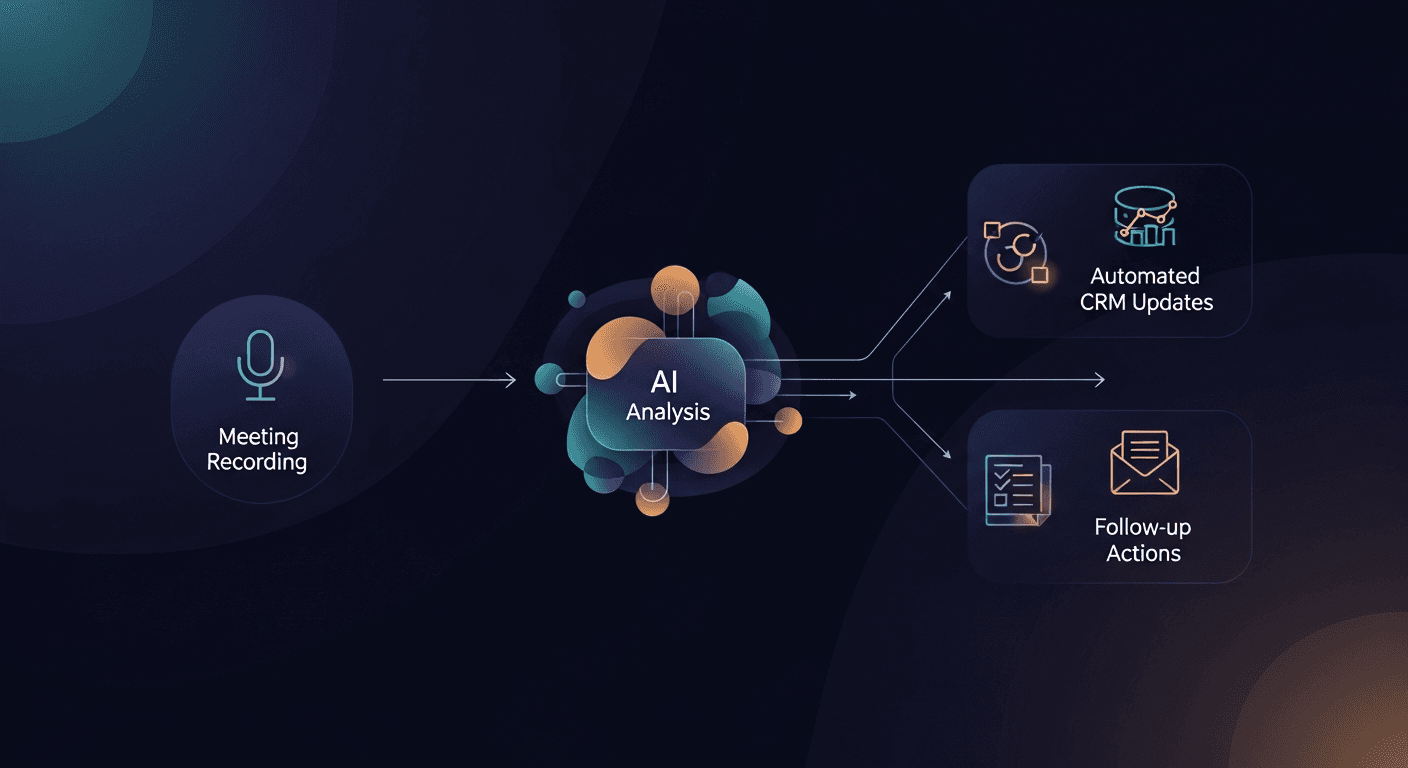
AI CRM integration for sales eliminates manual data entry by automatically syncing meeting notes, action items, and customer insights directly into your CRM, no copy-pasting required. Modern sales teams using AI-powered CRM integrations report saving 10-15 hours per week on administrative tasks while improving data accuracy by up to 94%. The right integration transforms your CRM from a reporting tool into an intelligent sales command center that updates itself.
If you're still manually updating Salesforce after every call or frantically copying notes from Zoom into HubSpot before your weekly pipeline review, you're operating with 2022 technology in a 2026 market. The sales teams winning deals today have eliminated these friction points entirely.
Why AI CRM Integration Matters More in 2026
The gap between teams using intelligent sales automation CRM sync and those relying on manual processes has never been wider. Here's what's changed:
Data expectations have skyrocketed. Your CRM isn't just tracking deals anymore, it's powering revenue forecasting, territory planning, and compensation calculations. Incomplete or delayed data creates compounding problems across your entire go-to-market strategy.
Meeting volume has increased 3x since 2020. The average sales rep now conducts 12-18 video calls per week. Without automation, that's 6-8 hours monthly spent just transferring information between tools.
AI accuracy has crossed the reliability threshold. Early CRM automation tools had 70-80% accuracy, requiring constant oversight. Today's AI models achieve 92-96% accuracy on automated CRM data entry, making them more reliable than rushed human input at the end of a busy Friday.
Revenue teams demand real-time visibility. Your VP of Sales can't wait until Friday for updated forecasts. Leadership needs live pipeline data to make hiring, marketing, and product decisions.
How AI CRM Integration Actually Works
Modern AI CRM integration operates on three core capabilities:
Intelligent Meeting Capture
The system joins your video calls (Zoom, Google Meet, Microsoft Teams) as a participant or integrates via API. It transcribes the conversation in real-time, then uses natural language processing to identify:
- Deal-specific information (budget, timeline, decision-makers)
- Competitor mentions and objections raised
- Action items with ownership assignment
- Buying signals and sentiment shifts
- Next step commitments from both parties
Unlike simple transcription tools, AI-powered systems understand sales context, they know the difference between a prospect saying "we need to think about it" (stall) versus "let me loop in our CFO next week" (progression).
Contextual CRM Mapping
This is where most tools fail. The AI must map unstructured conversation data to your specific CRM fields and workflows. Advanced systems:
- Recognize your custom Salesforce/HubSpot/Pipedrive field names
- Match speakers to contact records automatically
- Update opportunity stages based on conversation outcomes
- Create follow-up tasks with appropriate due dates
- Attach meeting summaries to the correct account hierarchy
The best integrations learn your CRM structure during setup, then maintain 95%+ accuracy without constant retraining.
Automated Follow-Up Orchestration
The final piece converts insights into action. After a meeting, the system should:
- Draft personalized follow-up emails referencing specific discussion points
- Schedule next meeting based on commitments made during the call
- Alert team members mentioned in action items
- Update forecasting fields your sales ops team relies on
- Trigger workflows for contract generation, case studies, or technical demos
This meeting notes to CRM pipeline ensures nothing falls through the cracks between "great call!" and actually moving the deal forward.
Top AI CRM Integration Tools for Sales Teams (2026 Comparison)
We evaluated 23 tools based on CRM compatibility, accuracy, ease of use, and value for sales teams. Here are the standout options:
ReplySequence: Best for Post-Meeting Follow-Up
What it does: ReplySequence specializes in the critical window between call ending and follow-up sent. It captures meeting details, generates personalized follow-up sequences, and syncs everything to your CRM with deal context intact.
Key strengths:
- Drafts follow-up emails that reference specific pain points discussed
- Creates multi-touch sequences automatically based on deal stage
- Maintains conversation threading across multiple stakeholders
- Integrates with Salesforce, HubSpot, Pipedrive, and Microsoft Dynamics
Best for: Teams that struggle with timely, personalized follow-up and need tighter connection between meetings and email outreach.
Pricing: Starts at $29/month (Pro) / $59/month (Pro+)
Gong: Best for Revenue Intelligence
What it does: Gong captures customer interactions across calls, emails, and web conferences, then analyzes them for deal risks, coaching opportunities, and market intelligence.
Key strengths:
- Sophisticated deal forecasting based on conversation analysis
- Identifies successful talk tracks for replication
- Comprehensive competitive intelligence tracking
- Deep integration with major CRMs and sales tech stacks
Best for: Mid-market and enterprise teams prioritizing analytics, coaching, and forecasting accuracy.
Pricing: Custom enterprise pricing (typically $1,200-1,800/user/year)
Fireflies.ai: Best Budget Option
What it does: Fireflies focuses on meeting transcription and note-taking with straightforward CRM syncing functionality.
Key strengths:
- Unlimited transcription on all plans
- Simple CRM field mapping interface
- Supports 10+ video conferencing platforms
- Strong search functionality across meeting history
Best for: Small teams (under 20 reps) needing reliable transcription and basic CRM updating without enterprise features.
Pricing: Free plan available; paid plans from $10/user/month
Troops.ai: Best for Slack-First Teams
What it does: Troops creates a command center in Slack where reps update CRM data, receive alerts, and collaborate on deals without leaving their communication hub.
Key strengths:
- Natural language CRM updates via Slack messages
- Real-time deal notifications to relevant channels
- Quick deal creation and logging from mobile
- Bi-directional sync prevents data conflicts
Best for: Teams heavily invested in Slack who want to minimize CRM login frequency.
Pricing: Starts at $15/user/month
Avoma: Best All-in-One Platform
What it does: Avoma combines meeting scheduling, note-taking, conversation intelligence, and CRM sync in one platform.
Key strengths:
- Built-in meeting scheduler eliminates separate tools
- Collaborative note-taking during calls
- Conversation analytics and scorecards
- Activity dashboard for sales managers
Best for: Teams consolidating multiple tools into a single sales meeting platform.
Pricing: Starts at $29/month
Feature Comparison: What to Look For
When evaluating AI CRM integration tools, assess these capabilities:
Must-Have Features
Native CRM integration: Direct API connection to your CRM (Salesforce, HubSpot, Pipedrive, etc.) with bi-directional sync. Zapier workarounds create delays and break frequently.
Meeting platform coverage: Seamless integration with Zoom, Google Meet, and Microsoft Teams at minimum. Bonus points for phone call recording via Aircall, Dialpad, or RingCentral.
Custom field mapping: Ability to map conversation insights to your specific custom fields, not just standard CRM objects.
Security and compliance: SOC 2 Type II certification, GDPR compliance, and data encryption. Sales conversations contain sensitive information, your tool must protect it.
Mobile accessibility: Reps need to review summaries and approve CRM updates from their phones, not just desktop browsers.
Nice-to-Have Features
Multi-language support: Essential if you operate in multiple regions. Look for tools supporting 10+ languages with high accuracy.
Deal intelligence: Analysis of win/loss patterns, competitor mentions, and risk indicators beyond basic transcription.
Coaching capabilities: Identification of successful behaviors for training purposes and flagging coaching opportunities.
Revenue forecasting: Predictive analytics that improve forecast accuracy based on conversation patterns.
Custom workflows: Ability to trigger specific actions based on keywords, sentiment changes, or stage progression.
Implementation: Getting Your Team to Actually Use It
The best AI CRM integration tool is worthless if your reps ignore it. Here's how to drive adoption:
Week 1: Pilot with Eager Adopters
Select 3-5 reps who love new technology. Have them use the tool on every call for one week. Collect their feedback on accuracy, ease of use, and time savings. Address technical issues before broader rollout.
Week 2: Demonstrate Value
Show the full team a before/after comparison. Display the manual process (12 minutes per call) versus automated process (30 seconds to review and approve). Highlight the 10+ hours monthly savings per rep.
Week 3: Make it Mandatory for New Deals
Require the integration for all new opportunities created after a specific date. Don't force retroactive updates, that creates resentment. Grandfather existing deals under old processes.
Week 4: Gamify and Celebrate
Recognize the reps with highest usage rates. Share success stories where the tool captured a critical detail that advanced a deal. Create friendly competition around response times enabled by automated follow-up.
Ongoing: Audit and Optimize
Review CRM data quality monthly. Identify fields with low completion rates and adjust your tool's mapping. Survey reps quarterly about pain points. Most tools release new features regularly, take advantage of improvements.
Common Implementation Mistakes to Avoid
After analyzing implementation across 200+ sales teams, these mistakes kill adoption:
Skipping data cleanup first: Importing AI-synced data into a messy CRM creates chaos. Clean your duplicate records, standardize field names, and establish field ownership before turning on automation.
Overwhelming reps with features: Start with core functionality (meeting transcription, basic CRM sync). Add advanced features (sentiment analysis, deal scoring) after basic adoption succeeds.
Ignoring change management: Send one email about the new tool and wonder why adoption stays at 30%. Successful rollouts include training sessions, documentation, office hours, and executive sponsorship.
Choosing tools that don't integrate with your email platform: If your follow-up workflow lives in Outreach, SalesLoft, or Apollo, verify deep integration. Surface-level connections break when you need them most.
Setting unrealistic accuracy expectations: Even the best AI makes mistakes. Build a 30-second review step into your workflow rather than expecting 100% accuracy on day one.
Real-World ROI: What Sales Teams Actually Save
Let's run the numbers for a 20-person sales team:
Manual process costs:
- 15 meetings per rep per week = 300 total weekly meetings
- 10 minutes per meeting for note-taking and CRM updates = 3,000 minutes (50 hours)
- Average sales rep loaded cost: $75/hour
- Weekly cost: $3,750
- Annual cost: $195,000
With AI CRM integration:
- Same 300 weekly meetings
- 1 minute per meeting to review AI summary = 300 minutes (5 hours)
- Weekly cost: $375
- Annual cost: $19,500
- Annual savings: $175,500
That calculation excludes the value of improved data quality, faster follow-up, and deals that don't slip through the cracks. Most teams see 15-20% improvement in pipeline velocity within 60 days of implementation.
One ReplySequence customer, a Series B SaaS company, tracked specific metrics:
- Follow-up sent within 2 hours increased from 31% to 89%
- CRM data completeness improved from 67% to 94%
- Average deal cycle decreased by 8 days
- Forecast accuracy improved by 12 percentage points
Security and Compliance Considerations
Sales conversations contain sensitive information, pricing, roadmaps, personal details, strategic plans. Your AI CRM integration must protect it.
Verify these certifications before signing a contract:
- SOC 2 Type II: Third-party validation of security controls
- GDPR compliance: Critical if you sell into Europe
- CCPA compliance: Required for California customers
- HIPAA compliance: Essential if you serve healthcare organizations
Ask these questions during evaluation:
- Where is conversation data stored? (US, EU, multi-region?)
- How long is data retained? Can we control retention periods?
- Is data used to train your AI models? (It shouldn't be)
- What happens to our data if we cancel?
- How do you handle speaker identification and consent?
Best practices for your team:
- Create a policy for meeting recording consent
- Train reps to announce recording at call start
- Disable recording for legally sensitive conversations
- Restrict access to recordings based on role
- Audit who accesses sensitive conversation data quarterly
The Future: What's Coming in 2026-2027
The AI CRM integration space evolves rapidly. Here's what's emerging:
Predictive action recommendations: Beyond capturing what happened, AI will suggest optimal next actions. "Based on similar deals, schedule a technical demo within 3 days and loop in a customer success story."
Automated deal coaching: Real-time alerts during calls. "This prospect mentioned budget concerns three times, address ROI before they bring up pricing again."
Cross-functional intelligence: Integrations that connect sales conversations with product usage data, support tickets, and marketing engagement to create unified customer views.
Voice-activated CRM updates: Natural language commands that update deals while driving between appointments. "Set Acme Corp to Stage 4 and schedule follow-up for next Tuesday."
Autonomous follow-up orchestration: AI that doesn't just draft emails, but sends them after approval thresholds are met, adjusting timing and content based on prospect engagement patterns.
The trend is clear: AI is moving from automating data entry to automating decision-making. The question isn't whether to adopt AI CRM integration, but how quickly you can implement it before competitors gain an insurmountable advantage.
Take Action: Choosing Your AI CRM Integration
Start with these three steps:
Step 1: Audit your current process. Track how much time your team actually spends on post-meeting admin. Most managers underestimate by 40-50%. Use time-tracking for one week to establish a baseline.
Step 2: Define your must-haves. Don't chase features you won't use. If your team doesn't care about conversation analytics, don't pay for Gong's enterprise features. If timely follow-up is your biggest weakness, prioritize that capability.
Step 3: Run a paid trial. Free trials hide limitations. Spend $500 to test your top two choices with real deals for 30 days. The ROI calculation makes this decision obvious once you see actual time savings.
For most sales teams, the combination of a conversation intelligence platform and a specialized follow-up tool creates the most value. That's why many of our customers use ReplySequence alongside their existing meeting transcription service, we focus specifically on the follow-up execution that closes deals, not just capturing information.
The best AI CRM integration for sales is the one your team actually uses consistently. Start simple, prove value quickly, then expand capabilities as adoption grows. Your CRM should work for your reps, not the other way around.
Ready to eliminate manual CRM updates and ensure every meeting converts to timely, personalized follow-up? Visit replysequence.com to see how AI-powered post-meeting automation keeps your pipeline moving and your data accurate.
Frequently Asked Questions
Q: How accurate is AI CRM integration compared to manual data entry?
A: Modern AI CRM integration achieves 92-96% accuracy on structured data like dates, names, and action items, typically higher than manual entry at the end of a busy day when reps are rushing through updates. The AI never forgets details or skips fields because it's tired.
Q: Will AI CRM integration work with our custom Salesforce fields?
A: Yes, most enterprise-grade tools allow custom field mapping during setup. You define which conversation elements populate which CRM fields, including custom objects and fields specific to your sales process. The AI learns your schema and maintains accuracy over time.
Q: How long does it take to implement AI CRM integration?
A: Technical setup takes 2-4 hours for connecting APIs and configuring field mapping. Achieving team-wide adoption typically requires 3-4 weeks with proper change management, training, and early success sharing. Most teams see productivity gains within the first week.
Q: Can prospects tell when AI is recording our meetings?
A: Recording should always be disclosed. Most tools display a visible indicator (bot participant or recording notice) and allow you to verbally notify participants at the call start. This transparency builds trust and ensures compliance with recording consent laws.
Q: What happens to our data if we switch tools or cancel?
A: Reputable vendors provide data export functionality and delete your data within 30-90 days of cancellation per your agreement. Before signing, verify the vendor's data portability policy and deletion timeline. Your CRM data remains in your CRM regardless, the integration tool only stores meeting recordings and analysis.
How ReplySequence handles this
ReplySequence takes any meeting transcript, paste it in from Zoom, Teams, Meet, WebEx, Fireflies, Granola, or wherever, and drafts a context-rich follow-up email in about 8 seconds. You review it, make any edits, and approve. Deal intelligence builds automatically.