Stop Drowning in CRM Data Entry After Calls
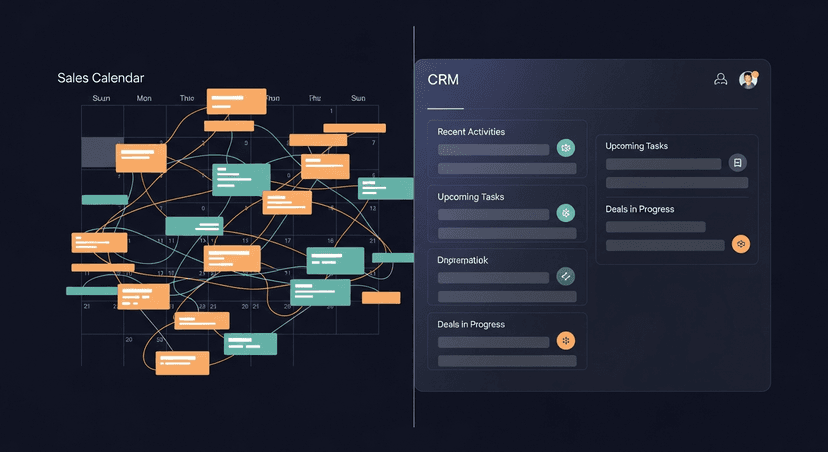
Everyone talks about CRM as the "single source of truth" for sales. Bullshit. For most reps, it's a data entry black hole that kills their day and slows down follow-ups. The problem with CRM isn't the tracking — it's the admin overhead that steals time from selling and delays the one thing that actually moves deals: getting back to the prospect fast.
Salesforce, HubSpot, Pipedrive — doesn't matter which one. The complaint is identical everywhere. Reps don't hate the concept of a CRM. They hate typing into it after every call when they could be writing the follow-up that actually closes the deal.
The Real Cost of CRM Data Entry: Time, Not Dollars
The CRM subscription is the visible cost. The invisible cost is worse: every call ends with a rep choosing between two admin tasks — log the call in the CRM, or write the follow-up email. Both compete for the same 15-minute window right after the meeting, when the transcript is fresh and the prospect is still thinking about what was said.
Most CRMs make logging a call take real effort — pick the contact, update the stage, write a note, tag the next step, sometimes update three or four custom fields your ops team added last quarter. That's not a two-minute task. It's closer to ten, and it competes directly with the follow-up email that has actual revenue attached to it.
The cost isn't the ten minutes. It's what those ten minutes replace. A rep with six calls a day isn't losing an hour to CRM entry — they're losing an hour they'd otherwise spend on the next prospect, or on writing a follow-up that doesn't read like it was dashed off between meetings.
Why 'Just Do It' Fails: The Rep's Perspective
Sales managers love to say "just update the CRM after every call." It's the right instruction and the wrong solution, because it ignores what a rep is actually optimizing for in that moment: pipeline, not process.
Right after a good call, a rep's brain is doing one thing — figuring out how to keep the deal moving. CRM entry doesn't move the deal. The follow-up email does. So when time is short, the follow-up wins and the CRM update gets pushed to "later." Later becomes end of day. End of day becomes Friday. Friday becomes never, because by then the details are gone and the rep is guessing at what stage the deal is actually in.
This isn't a discipline problem. It's a sequencing problem — the CRM update sits behind the follow-up in priority, and anything behind the follow-up in a rep's day has a real chance of not happening at all.
The Gap: Meetings Happen, Follow-Ups Lag, CRM Stays Empty
Here's the actual failure mode, step by step. A call ends at 2:45pm. The rep has a 3:00pm booked. The follow-up email gets sent — maybe — sometime between 3:00pm and never, depending on how the rest of the day goes. The CRM update, if it happens, happens days later from memory instead of from notes.
The result is a CRM full of stale stage tags and blank activity logs, sitting next to a pipeline where half the recent meetings never got a follow-up at all. Forecasting on top of that data is forecasting on fiction. And the rep gets blamed for "not using the CRM" when the real issue is that manual entry was never going to survive contact with a full calendar.
Automate the Mundane, Not the Message
The fix isn't asking reps to try harder. It's removing the manual step between "call ends" and "CRM reflects reality." That means taking the transcript — which already exists if you're recording calls with Fireflies, Otter, Fathom, Granola, Zoom, Teams, or Meet — and using it to do two things automatically: draft the follow-up, and log the activity.
Automation shouldn't touch the judgment calls. It shouldn't decide pricing, or promise a discount, or guess at next steps that need a human read on the deal. What it should do is handle the parts that are pure transcription-to-structure work — pulling out who said what, what was agreed, what the next step is — and turning that into both an email draft and a CRM note without a rep retyping any of it twice.
A real follow-up drafted from a transcript looks like this:
Subject: Next steps from today — [Company] + [Your Company]

Hi [First Name],

Good talking through the onboarding timeline today. To confirm what we covered:

- You'll loop in [Stakeholder Name] on the security review by Friday
- I'll send the SOC 2 docs and pricing breakdown for the 25-seat tier
- We'll reconnect Thursday at 2pm to go over their feedback

Let me know if I missed anything.

[Your Name]
That same transcript should also produce a CRM log entry — stage, next step, date of next touch — without the rep opening the CRM tab at all.
ReplySequence: From Transcript to CRM Update, in Seconds
This is the exact gap ReplySequence sits in. Paste a transcript from any recorder — BYOT, bring your own transcript, no bot required in the meeting — and get a follow-up draft back in 60 seconds, written in your voice because the voice-fingerprint learns from your past edits instead of defaulting to generic AI phrasing.
The part that matters for the CRM problem specifically: RS logs the activity at the same time it drafts the email. Transcript in, follow-up out, CRM updated — one paste, not two separate chores competing for the same ten minutes after a call.
It's draft-first, always. Nothing sends without you looking at it first. And it's not a replacement for Fireflies or Otter or Fathom — it's the layer that comes after them. They capture the meeting. RS handles what happens next: the email and the record, done together instead of one at the expense of the other.
Pro is $29/mo for unlimited drafts, voice-fingerprint, sequences, and CRM log. Team is $39/user/mo (3-seat minimum) if you want shared templates and team voice profiles. There's a 14-day Pro trial, no credit card required, and a free tier with 10 drafts/month if you want to see the CRM log work on a real transcript before committing to anything.
More Selling, Less Admin: Reclaiming Rep Time
The CRM was never the problem. Manual entry was. Once the follow-up and the CRM update come from the same transcript at the same time, the choice reps were making between selling and admin disappears — because the admin stops requiring a choice at all.
How ReplySequence handles this
ReplySequence takes any meeting transcript, paste it in from Zoom, Teams, Meet, WebEx, Fireflies, Granola, or wherever, and drafts a context-rich follow-up email in about 8 seconds. You review it, make any edits, and approve. Deal intelligence builds automatically.