Best Meeting Management Software for Sales Teams 2026
The best meeting management software for sales teams in 2026 combines AI-powered note-taking, automated follow-up sequences, and deep CRM integration: so nothing falls through the cracks after a call. If your reps are still writing follow-up emails manually or losing deal momentum between meetings, you're leaving revenue on the table.
Below is a practical, no-fluff comparison of the top tools on the market right now, evaluated specifically for sales workflows: not generic project management or HR use cases.
Why Meeting Management Software Matters More Than Ever in 2026
The average sales rep spends 9+ hours per week on administrative tasks related to meetings, scheduling, note-taking, updating the CRM, and writing follow-up emails. That's more than 20% of a 40-hour workweek gone before a single prospecting call is made.
Buyer expectations have also shifted. A 2025 Salesforce study found that 78% of B2B buyers expect a personalized follow-up within 2 hours of a sales meeting. If your team takes 24–48 hours, a competitor who responds faster will win the deal, even if your product is stronger.
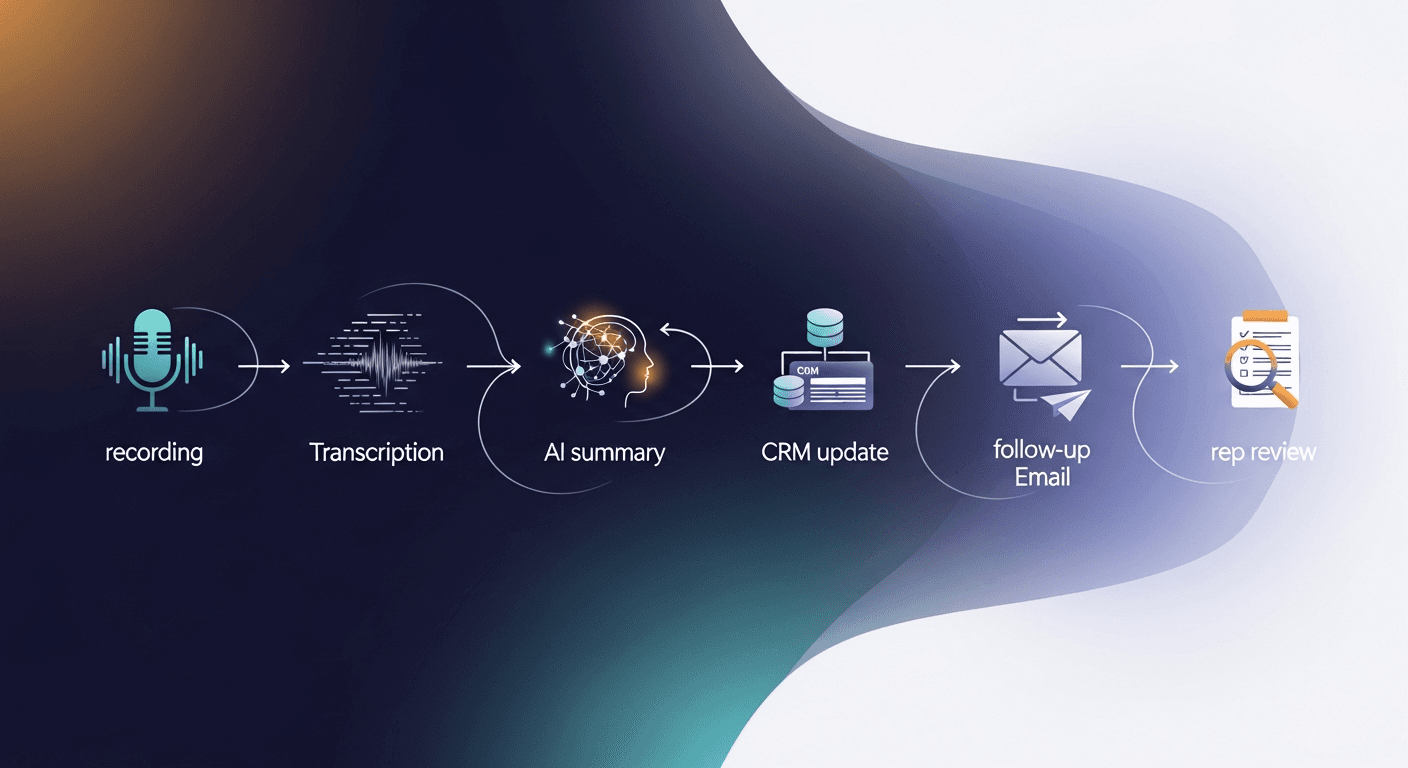
Meeting management software for sales teams solves this by automating the repetitive work: transcribing conversations, generating action items, syncing notes to your CRM, and triggering follow-up sequences, all without the rep lifting a finger.
What to Look for in Sales Meeting Management Software
Before diving into the comparison, here's what actually matters when evaluating these tools for a sales context:
- AI transcription accuracy, Does it correctly capture product names, pricing, and objections?
- CRM integration depth, Does it write back to your CRM automatically, or just export a PDF?
- Automated follow-up capabilities, Can it draft or send follow-up emails based on meeting content?
- Action item extraction, Does it pull out next steps and assign them to the right person?
- Ease of adoption, Will your reps actually use it, or will it collect dust?
- Security and compliance, Especially important for enterprise sales with NDAs and sensitive deal data
—-
The Top Meeting Management Software for Sales Teams in 2026
1. ReplySequence, Best for Automated Post-Meeting Follow-Up
Best for: Sales teams whose biggest bottleneck is the follow-up gap after discovery and demo calls
ReplySequence is purpose-built for one of the most painful parts of the sales process: everything that happens after the meeting ends. Where most tools stop at transcription and note summaries, ReplySequence takes the meeting output and automatically builds personalized follow-up email sequences based on what was actually discussed.
Key capabilities:
- AI-generated follow-up emails drafted from meeting transcripts in minutes
- Multi-touch follow-up sequences triggered automatically based on meeting type (discovery, demo, negotiation)
- CRM sync that logs call summaries, action items, and email activity in one click
- Deal stage advancement suggestions based on conversation signals
- Objection tracking across your pipeline to identify coaching opportunities
Real-world scenario: A mid-market SaaS AE finishes a 45-minute demo. Before they've even closed their laptop, ReplySequence has already drafted a personalized recap email referencing the prospect's specific pain points, a sequence of two follow-up touches spaced over the next week, and updated the CRM opportunity with a call summary and next steps.
Pricing: Starts at $49/seat/month. Team plans available.
Where it excels: Speed to follow-up, personalization at scale, reducing rep admin burden
Where it's limited: Less focused on pre-meeting scheduling features, pairs best with a dedicated scheduling tool like Calendly
—-
2. Gong, Best for Conversation Intelligence at Scale
Best for: Large sales orgs that want deep analytics on rep performance and deal health
Gong is the heavyweight of conversation intelligence. It records, transcribes, and analyzes every customer-facing call, then surfaces insights about deal risk, rep talk ratios, competitor mentions, and more.
Key capabilities:
- AI-powered call scoring and coaching recommendations
- Deal intelligence that flags at-risk opportunities
- Team-wide analytics on objection handling, talk patterns, and more
- Integration with Salesforce, HubSpot, and most major CRMs
Where it excels: Pipeline visibility, manager coaching, enterprise-level analytics
Where it's limited: Expensive (typically $100–$200+/seat/month), complex to set up, and the follow-up automation is not as streamlined as dedicated tools. Overkill for SMB teams.
—-
3. Fireflies.ai, Best Budget-Friendly Transcription Tool
Best for: Small sales teams that need reliable meeting transcription without a big budget
Fireflies.ai has become a go-to for teams that want accurate AI transcription, searchable meeting archives, and basic CRM logging without paying enterprise prices.
Key capabilities:
- Accurate transcription across Zoom, Google Meet, Teams, and more
- Searchable meeting library with topic and keyword filters
- Basic CRM integration for pushing notes to Salesforce and HubSpot
- AskFred AI assistant for summarizing meetings on demand
Where it excels: Price (free tier available, paid plans from ~$18/seat/month), ease of setup, transcript quality
Where it's limited: Follow-up automation is minimal: you still need to write and send your own follow-up emails. Best used as a transcription layer rather than a full sales workflow tool.
—-
4. Otter.ai, Best for Real-Time Collaboration and Note-Taking
Best for: Sales teams that want live transcription and shared notes during calls
Otter.ai shines in collaborative settings: it produces live transcripts that team members can annotate in real time, making it useful for complex enterprise deals where multiple stakeholders are on a call.
Key capabilities:
- Real-time transcription with speaker identification
- Collaborative note-taking and highlighting
- Otter AI chat for summarizing and querying transcripts
- Basic calendar and video conferencing integrations
Where it excels: Live collaboration, simplicity, affordable pricing
Where it's limited: Weak CRM integration and no automated follow-up: it's a note-taking tool, not a sales automation platform.
—-
5. Fathom, Best Free Option for Individual Reps
Best for: Individual contributors or early-stage teams who want a free AI notetaker
Fathom has earned a loyal following for its generous free tier and clean UX. It records Zoom calls, generates highlights and summaries, and syncs notes to your CRM.
Key capabilities:
- Free for individual use (unlimited recordings on free plan)
- AI-generated call summaries and highlight reels
- HubSpot and Salesforce sync
- Slack notifications with call summaries
Where it excels: Zero cost to start, beautiful UI, fast summaries
Where it's limited: Limited team features on free plan, no follow-up sequence automation, not built for complex multi-rep sales organizations
—-
How to Choose the Right Tool for Your Sales Team
Here's a simple decision framework based on your team's primary pain point:
If your biggest problem is slow or inconsistent follow-up:
Use ReplySequence. The follow-up gap is where most deals die, and automating it is the highest-leverage move a sales team can make.
If your biggest problem is rep coaching and pipeline visibility:
Use Gong. The analytics are unmatched, and if you have budget, it pays for itself in improved win rates.
If your biggest problem is disorganized meeting notes and no CRM logging:
Use Fireflies.ai or Fathom. Both are easy to set up and dramatically reduce the time reps spend on manual data entry.
If you're an individual rep on a budget:
Fathom's free plan is hard to beat as a starting point.
—-
The Stack That Actually Works in 2026
The most effective sales teams aren't choosing one tool: they're building a lightweight stack that handles the full meeting lifecycle:
- Scheduling: Calendly or Chili Piper to eliminate back-and-forth
- During the meeting: Fathom or Fireflies for real-time transcription
- After the meeting: ReplySequence to automate follow-up sequences and CRM updates
- Pipeline analytics: Gong or your CRM's native reporting
This approach gives you coverage at every stage without paying for bloated all-in-one platforms that do everything adequately but nothing exceptionally.
The average sales team using automated follow-up tools sees a 30–40% reduction in time-to-follow-up and a measurable lift in reply rates: because personalized, timely follow-ups convert at a higher rate than generic templates sent two days later.
Final Verdict: Best Meeting Management Software for Sales Teams
For most sales teams evaluating meeting management software in 2026, the decision comes down to what's hurting your win rate most. If deals are dying in the follow-up gap (which is true for the majority of B2B sales teams) then a dedicated post-meeting automation tool is worth prioritizing over yet another transcription app.
ReplySequence was built specifically for this problem. It doesn't try to be a call analytics platform or a scheduling tool: it focuses on the one thing that turns a good meeting into a closed deal: the follow-up.
Ready to see how much time your team could save? Head to replysequence.com to start a free trial and get your first AI-generated follow-up sequence running in under 10 minutes.
How ReplySequence handles this
ReplySequence takes any meeting transcript, paste it in from Zoom, Teams, Meet, WebEx, Fireflies, Granola, or wherever, and drafts a context-rich follow-up email in about 8 seconds. You review it, make any edits, and approve. Deal intelligence builds automatically.