Back to blog
CRM automation meeting notesmeeting notes CRMauto-log meetingsCRM data entry

CRM Automation for Meeting Notes

Jimmy HackettMarch 24, 202613 min read
Share:

```json

{

"title": "CRM Automation for Meeting Notes: End Manual Data Entry Forever",

"slug": "crm-automation-for-meeting-notes",

"excerpt": "CRM automation for meeting notes eliminates manual data entry by capturing conversation details, action items, and deal insights automatically—saving reps 5-10 hours per week.",

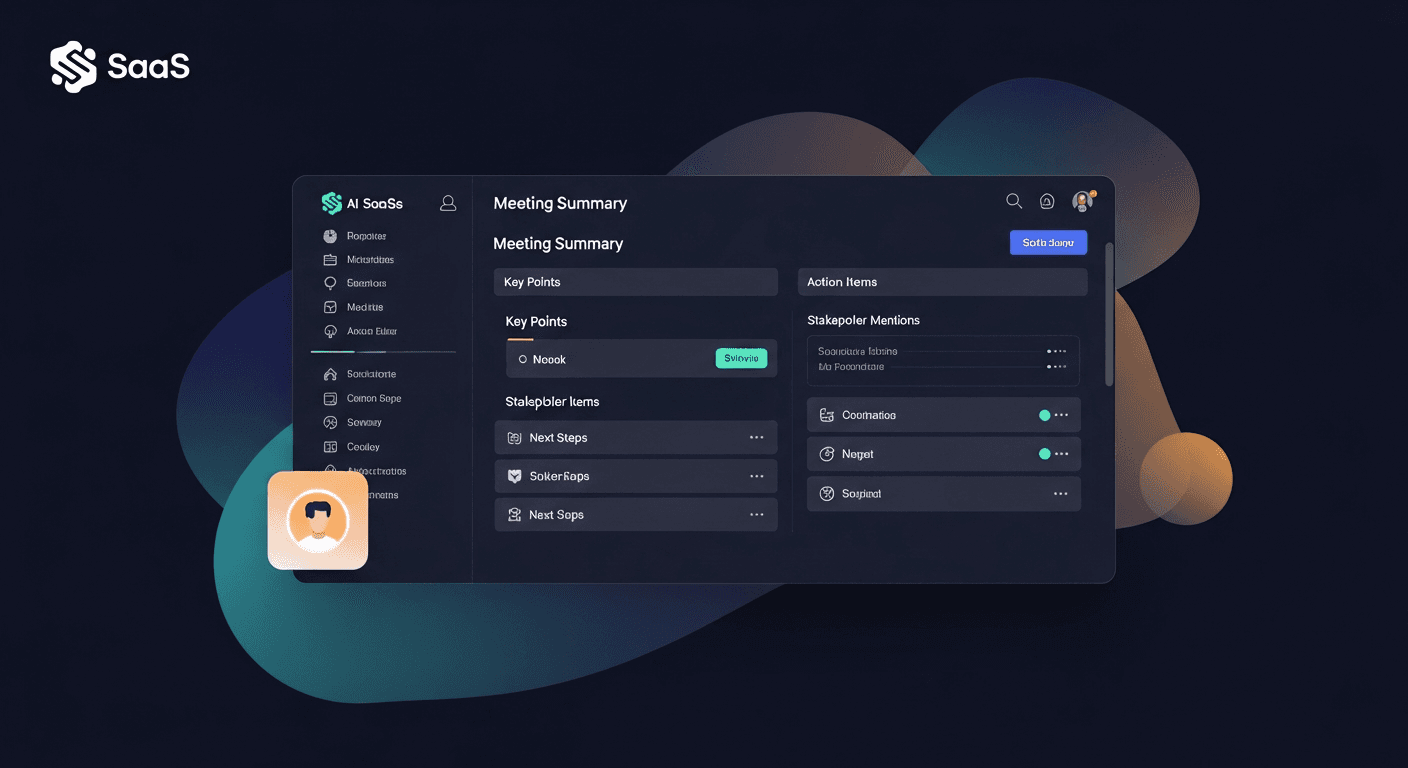
"content": "CRM automation for meeting notes uses AI to automatically capture, summarize, and log sales conversations directly into your CRM—eliminating manual note-taking and ensuring no deal-critical details slip through the cracks. Instead of spending 30-45 minutes after each call typing up what happened, automated systems extract action items, update deal stages, and populate custom fields while your team focuses on selling.\n\nThe average sales rep spends 2.5 hours per day on CRM data entry, according to Salesforce research. For a team of 10 reps, that's 25 hours daily—an entire full-time employee's worth of productivity lost to administrative work. Meeting notes automation recovers this time while simultaneously improving data quality and consistency across your pipeline.\n\n## The Hidden Cost of Manual Meeting Notes\n\nWhen sales reps manually log meeting notes, three critical problems emerge that compound over time:\n\nInconsistent data quality across the team. Your top performer might write detailed paragraphs about discovery calls, while another rep types "discussed pricing" and calls it done. This inconsistency makes pipeline reviews unreliable and prevents leadership from identifying patterns across deals.\n\nCritical details forgotten or omitted. Research shows humans forget 40% of new information within 20 minutes of learning it. By the time your rep finishes their third call of the day and sits down to update the CRM, they've already lost key objections, stakeholder names, or timeline commitments that could make or break the deal.\n\nDelayed follow-up that kills momentum. When reps batch their CRM updates at day's end, follow-up emails get delayed until the next morning—or worse, until they remember two days later. By then, the prospect's attention has shifted, and your carefully built rapport has cooled.\n\nOne enterprise software company tracked their manual note-taking process and discovered reps were logging notes for only 63% of their meetings. The remaining 37% simply never made it into the CRM, creating blind spots in their pipeline forecast and leaving account executives without context when they took over deals.\n\n## How CRM Automation Captures Meeting Intelligence\n\nModern meeting notes CRM automation works through three integrated layers:\n\n### Real-Time Conversation Capture\n\nAI-powered systems join your video calls or dial into phone meetings, recording and transcribing conversations with 95%+ accuracy. Unlike human note-takers who miss details while formulating their next question, automated systems capture every word, question, objection, and commitment.\n\nThe transcription happens in real-time, meaning the system can identify key moments as they occur—when a prospect mentions budget authority, expresses a pain point, or commits to a timeline. These moments get tagged automatically for easy reference.\n\n### Intelligent Summarization and Extraction\n\nRaw transcripts aren't useful—a 45-minute discovery call generates 6,000+ words of text. This is where AI analysis transforms noise into signal:\n\n- Action items and next steps extracted with owners and due dates\n- Key objections and concerns identified and categorized\n- Stakeholder information pulled from the conversation (names, roles, decision-making power)\n- Buying signals and timeline commitments highlighted for prioritization\n- Technical requirements or feature requests captured for product teams\n- Competitive mentions flagged for sales enablement\n\nOne sales team using automated meeting notes found that their AI system was catching 3-4 action items per call that reps hadn't written down manually—small commitments that, when followed up on, differentiated them from competitors who dropped the ball.\n\nDashboard screenshot showing an AI-generated meeting summary with sections for key points, action items, stakeholder mentions, and next steps, all formatted cleanly for quick scanning\n\n### Automatic CRM Population\n\nThe final layer is where automation delivers its biggest time savings. Instead of copying information from notes into various CRM fields, the system:\n\n- Updates deal stage based on conversation progress (demo scheduled, proposal requested, etc.)\n- Populates custom fields like budget range, decision timeline, or competitor evaluations\n- Logs activities with proper categorization and timestamps\n- Creates follow-up tasks assigned to the right team members with context\n- Enriches contact records with new stakeholder details mentioned during calls\n- Triggers workflows based on specific conversation triggers (pricing discussion → send case study)\n\nReplySequence takes this a step further by not just logging the meeting but automatically generating and sending personalized follow-up emails based on what was discussed, with relevant resources attached—all before your rep joins their next call.\n\n## Auto-Log Meetings: Technical Implementation\n\nSetting up meeting notes automation requires integration at three touchpoints:\n\n### Calendar and Conferencing Integration\n\nYour automation system needs permission to access your calendar and automatically join scheduled meetings. Most modern solutions integrate with:\n\n- Google Calendar and Microsoft Outlook for meeting detection\n- Zoom, Google Meet, Microsoft Teams for video call access\n- Phone systems like Aircall or Dialpad for voice call recording\n\nConfiguration typically takes under 15 minutes per user. The system watches for calendar events tagged as "sales call" or "prospect meeting" and joins automatically without manual intervention.\n\n### CRM Integration and Field Mapping\n\nThe automation tool must understand your CRM's data structure to populate the right fields. During setup, you'll map conversation insights to specific CRM fields:\n\n- Budget range discussions → Budget field\n- Timeline commitments → Close date estimates\n- Decision-maker identification → Contact role field\n- Pain points → Custom fields or deal notes\n- Competitor mentions → Competitive intelligence fields\n\nSalesforce, HubSpot, and Pipedrive integrations are typically pre-built. For custom CRMs, most automation platforms offer API connections that your technical team can configure in a few hours.\n\n### Workflow Automation Rules\n\nThe most powerful implementations use conversation triggers to launch automated workflows:\n\nExample workflow: When a prospect mentions they're "evaluating three vendors" → System automatically sends a competitive comparison PDF and schedules a check-in task for 3 days later.\n\nExample workflow: When a prospect asks about implementation timelines → System logs this as a high buying signal, notifies the sales manager, and moves the deal to "Evaluation" stage.\n\nThese rules transform passive note-taking into active revenue acceleration.\n\nFlowchart showing how a recorded meeting flows through transcription, AI analysis, CRM data population, and automated follow-up generation\n\n## Real-World Impact: Three Implementation Stories\n\n### SaaS Startup Scales Without Scaling Admin Work\n\nA 15-person sales team at a B2B SaaS company was drowning in post-call admin work. Their AE's were running 6-8 demos per day, and CRM hygiene was falling apart.\n\nAfter implementing meeting notes automation:\n\n- CRM completion rate jumped from 61% to 98% within two weeks\n- Average time from call to follow-up email dropped from 18 hours to 14 minutes\n- Reps reported 7 additional selling hours per week per person\n- Sales leadership gained visibility into objection patterns they'd never tracked before\n\nThe VP of Sales noted: "We're now having coaching conversations based on actual transcripts, not reps' selective memory of what happened. The quality of our pipeline reviews improved overnight."\n\n### Enterprise Team Eliminates Handoff Gaps\n\nA complex enterprise sales process involving SDRs, AEs, and solution engineers was plagued by context loss during handoffs. SDRs would qualify leads but fail to communicate crucial details to AEs.\n\nAutomated meeting notes created a complete conversation history:\n\n- AEs started every first call already knowing the full discovery context\n- Solution engineers could review technical questions asked during earlier calls\n- Deal cycles shortened by 12 days on average due to reduced repetition and better preparation\n- Win rates increased 8% because teams could reference specific commitments prospects made\n\n### Services Firm Improves Client Retention\n\nA consulting firm used meeting notes automation for internal client check-ins, not just sales calls. The system captured client concerns, feature requests, and satisfaction signals that previously lived only in individual consultants' heads.\n\nResults after six months:\n\n- Client churn dropped 23% because renewal teams had early warning signals\n- Upsell opportunities increased as patterns emerged across client conversations\n- Account managers could seamlessly cover each other's accounts during vacation or illness\n\nThe Managing Partner explained: "Our institutional knowledge was walking out the door every time someone quit. Now it's preserved in our CRM."\n\n## Overcoming Common Implementation Concerns\n\n### \"Will prospects be uncomfortable with call recording?\"\n\nTransparency is key. Start every recorded call with: "Just so you know, I'm recording this call so I can focus on our conversation instead of taking notes. Is that okay with you?"\n\nIn practice, less than 2% of prospects object, and those who do typically agree to just the rep taking manual notes. Most prospects appreciate that you're being attentive rather than distracted by note-taking.\n\n### \"What about data security and compliance?\"\n\nReputable automation platforms offer:\n\n- SOC 2 Type II certification for enterprise security standards\n- GDPR and CCPA compliance with data retention controls\n- Encryption at rest and in transit for all recordings and transcripts\n- Granular permission controls so only authorized team members access sensitive calls\n\nFor highly regulated industries (healthcare, finance), look for platforms with specific compliance certifications like HIPAA or PCI-DSS.\n\n### \"How accurate is AI at understanding industry terminology?\"\n\nModern AI models can be trained on your specific vocabulary—product names, industry jargon, competitor names. During the first 2-3 weeks, you'll correct any misinterpretations, and the system learns your terminology.\n\nMost teams report 90%+ accuracy after the learning period, which is significantly better than human recall from memory hours after a call ended.\n\nBefore/after comparison showing a messy, incomplete manual CRM note entry versus a clean, structured, comprehensive AI-generated meeting summary with all key fields populated\n\n## Choosing the Right Meeting Notes Automation Platform\n\nWhen evaluating CRM data entry automation tools, prioritize these capabilities:\n\nNative CRM integration depth. The tool should do more than just create a note—it should populate fields, update stages, create tasks, and trigger workflows without manual intervention.\n\nCustomizable extraction templates. Different call types (discovery, demo, negotiation) require different information captured. Your platform should let you define what gets extracted based on meeting type.\n\nTeam analytics and coaching features. Beyond individual call notes, look for aggregated insights: What objections appear most frequently? Which reps handle pricing discussions most effectively? What talk-to-listen ratios correlate with closed deals?\n\nFollow-up automation. Logging the meeting is only half the battle—the real revenue impact comes from automated, personalized follow-up that happens while the conversation is still fresh in the prospect's mind.\n\nConversation intelligence. Advanced platforms analyze sentiment, detect buying signals, and flag risk indicators (prospect disengagement, competitor preference) that human note-takers miss.\n\nReplySequence combines all these capabilities in a platform specifically designed for sales teams who want meeting intelligence that drives revenue, not just cleaner CRM data. Visit replysequence.com to see how automated post-meeting follow-up transforms meeting notes from a data entry task into a competitive advantage.\n\n## Implementation Best Practices\n\nTo maximize your ROI from meeting notes automation:\n\nStart with a pilot team. Roll out automation to 3-5 reps first, gather feedback, refine your field mappings and workflows, then expand company-wide. This prevents organization-wide disruption while you optimize the setup.\n\nCreate standardized meeting types. Define templates for discovery calls, product demos, pricing discussions, and check-ins. Each template should specify what information gets extracted and how it maps to your CRM.\n\nTrain reps on conversation structure. When your team knows their calls are being automatically analyzed, they naturally develop better meeting discipline—asking for clear next steps, confirming decision-maker involvement, and addressing objections directly rather than avoiding them.\n\nReview automated outputs weekly at first. Spend 15 minutes each week checking that the AI is extracting information correctly and mapping it to the right CRM fields. This quality control period typically lasts 3-4 weeks before you can trust the automation completely.\n\nUse conversation data for coaching. The real power of meeting notes automation emerges when managers use actual conversation transcripts for coaching: "Let's listen to how you handled this objection" is infinitely more valuable than "Tell me how you think that call went."\n\n## The Future of CRM Data Entry Is Zero-Touch\n\nManual CRM data entry is already obsolete—forward-thinking sales organizations are moving toward zero-touch CRM hygiene where conversations automatically update systems, trigger follow-ups, and route opportunities without human intervention.\n\nThe question isn't whether to automate meeting notes, but how quickly you can implement automation before your competitors gain the productivity and intelligence advantages it provides.\n\nSales teams using meeting notes CRM automation don't just save time—they sell more effectively because they never forget a detail, follow up faster, and make decisions based on complete information rather than fragmented memory.\n\nReady to eliminate CRM data entry and turn every meeting into automatically logged intelligence and instant follow-up? Visit replysequence.com to see how AI-powered post-meeting automation gives your team hours back every week while improving data quality, response speed, and deal visibility across your entire pipeline.\n\n## Frequently Asked Questions\n\nQ: How much time does CRM automation for meeting notes actually save per rep?\n\nA: Most sales reps save 5-10 hours per week by eliminating manual note-taking and CRM data entry. For teams running 20+ meetings weekly, the time savings can reach 12-15 hours per rep, effectively adding two full selling days back to each week.\n\nQ: Can meeting notes automation integrate with custom CRM fields and workflows?\n\nA: Yes, modern automation platforms can map AI-extracted conversation insights to any custom CRM field through API integrations. You define which conversation topics map to which fields during setup, and the system populates them automatically after each call.\n\nQ: What happens if the AI misinterprets something important during a sales call?\n\nA: Reputable platforms include review and editing capabilities where reps can quickly correct any misinterpretations before the data syncs to your CRM. After 2-3 weeks of corrections, the AI learns your terminology and accuracy typically exceeds 95%.\n\nQ: Do prospects react negatively to having sales calls recorded and analyzed by AI?\n\nA: When disclosed transparently at the call's start, less than 2% of prospects object to recording. Most appreciate that reps are fully present in the conversation rather than distracted by note-taking, leading to more engaging and productive meetings.\n\nQ: How does auto-logging meetings improve sales team performance beyond time savings?\n\nA: Automated meeting notes create consistent data quality across your team, enable managers to coach based on actual conversations rather than recall, prevent critical details from being forgotten, and accelerate follow-up timing—often resulting in 8-15% higher win rates and shorter sales cycles.",

"date": "2026-03-24",

"author": "Jimmy Hackett",

"tags": ["CRM automation", "meeting notes", "sales productivity", "AI tools", "sales enablement"],

"readingTime": 11,

"faqs": [

{

"question": "How much time does CRM automation for meeting notes actually save per rep?",

"answer": "Most sales reps save 5-10 hours per week by eliminating manual note-taking and CRM data entry. For teams running 20+ meetings weekly, the time savings can reach 12-15 hours per rep, effectively adding two full selling days back to each week."

},

{

"question": "Can meeting notes automation integrate with custom CRM fields and workflows?",

"answer": "Yes, modern automation platforms can map AI-extracted conversation insights to any custom CRM field through API integrations. You define which conversation topics map to which fields during setup, and the system populates them automatically after each call."

},

{

"question": "What happens if the AI misinterprets something important during a sales call?",

"answer": "Reputable platforms include review and editing capabilities where reps can quickly correct any misinterpretations before the data syncs to your CRM. After 2-3 weeks of corrections, the AI learns your terminology and accuracy typically exceeds 95%."

},

{

"question": "Do prospects react negatively to having sales calls recorded and analyzed by AI?",

"answer": "When disclosed transparently at the call's start, less than 2% of prospects object to recording. Most appreciate that reps are fully present in the conversation rather than distracted by note-taking, leading to more engaging and productive meetings."

},

{

"question": "How does auto-logging meetings improve sales team performance beyond time savings?",

"answer": "Automated meeting notes create consistent data quality across your team, enable managers to coach based on actual conversations rather than recall, prevent critical details from being forgotten, and accelerate follow-up timing—often resulting in 8-15% higher win rates and shorter sales cycles."

}

]

}

```

How ReplySequence handles this

ReplySequence connects to your Zoom, Teams, or Meet calls, reads the transcript, and drafts a context-rich follow-up email in about 8 seconds. You review it, make any edits, and send from your real inbox. Your CRM updates automatically.

Get meeting productivity tips in your inbox

Actionable follow-up strategies, templates, and product updates. No spam.