Automate Meeting Follow-Up Without a Bot
Your Fireflies transcript is sitting in your inbox. The meeting went great. You're already in the next call, and that follow-up isn't getting written today.
That's the actual failure mode. Not the meeting. The gap between the meeting and the sent email.
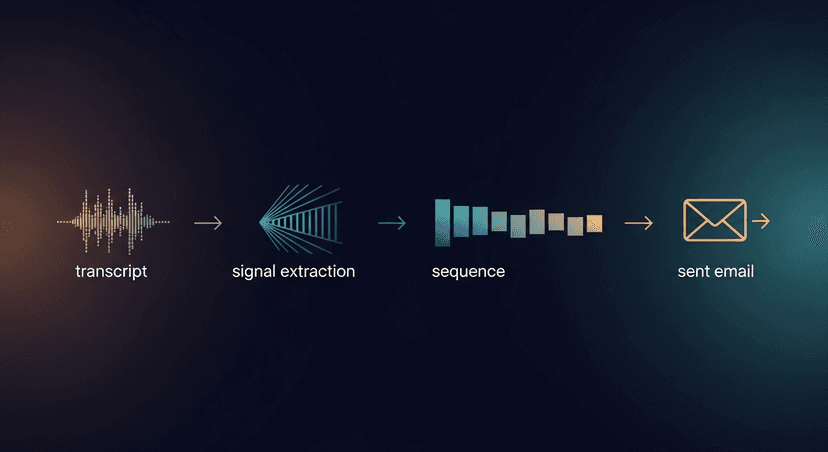
You don't need a bot joining every call to automate meeting follow-up. You need a transcript and a process that turns it into a sent email in under 60 seconds. That's what this guide builds.
What You Need Before You Start
One thing: a transcript. That's it.
It doesn't matter where it came from. Fireflies auto-emails it to you. Otter lets you download it. Fathom has a copy button. Zoom generates a cloud transcript. Teams exports one. You can paste manual notes from a Word doc. The input is just text.
This matters because not every meeting allows a bot. Some prospects push back the moment they see a third-party recorder join. Some enterprise calls have IT policies that block them. Some calls happen over the phone.
BYOT (bring your own transcript) reframes what automation means here. Automation doesn't require a persistent bot in every meeting. It requires a repeatable process that works on any text input. Once you have the transcript, the rest is the same every time.
Step 1: Get Your Transcript: Any Way You Can
Here's where to find the text in each tool:
- Fireflies: Check your inbox after the call, Fireflies emails you the transcript automatically. Open it, select all transcript text, copy.
- Otter: Go to otter.ai → My Conversations → open the session → Export → Text.
- Fathom: Open the call summary → click the transcript tab → use the copy button top-right.
- Zoom: Zoom web portal → Recordings → open the recording → Transcript tab → copy the full text.
- Teams: Teams admin center or the meeting chat, Teams posts a transcript link post-call. Open it → download as .docx or copy directly.
- Manual notes / Word doc: Paste whatever you have. Bullet points work. Rough sentences work. The process handles messy input.
The output of Step 1 is a block of raw text in your clipboard. That's all you need.
Step 2: Strip It Down to the Signal
This is the step most people skip. They copy the transcript and try to write an email from 40 minutes of text. The follow-up ends up generic because nothing specific was extracted first.
Before you write a word, pull exactly four things:
- The stated next step, what did you or the prospect say would happen after this call?
- The prospect's named pain, in their words, not your assumption
- Any number or date mentioned, budget range, timeline, a deadline they referenced
- The explicit ask you made, what you said you'd send, schedule, or decide
Raw transcript snippet:
> "Yeah the main thing for us is the handoff between SDR and AE: we lose deals there. Budget's probably Q3, so like September. Jordan said she'd want to see a pilot before anything gets signed. Can you send something over by end of week?"
Signal extraction:
- Next step: send a pilot proposal by Friday
- Named pain: SDR-to-AE handoff, deals lost in transition
- Number/date: Q3 budget, September; deadline Friday
- Explicit ask: proposal in their inbox by end of week
That's what goes in the email. Not a summary. Not a recap. Four specific lines.
Step 3: Map the Follow-Up to a Sequence Shape
Two shapes cover 90% of post-meeting situations:
Shape A, Warm demo or qualified discovery call:
- Touch 1: Same day, within 2 hours, confirm next steps, attach anything you promised
- Touch 2: 48 hours, drop the resource, case study, or pilot doc
- Touch 3: 5 business days, check-in if no response
Shape B, Cold intro or early-stage call:
- Touch 1: Same day, within 2 hours, confirm the conversation happened, single CTA
- Touch 2: 72 hours: one short nudge, different angle
Subject lines for each touchpoint:
- Touch 1 (both shapes):
Next steps from our call, [date] - Touch 2 (Shape A):
Pilot doc for [Company], as promised - Touch 3 (Shape A):
Quick question before [their stated deadline] - Touch 2 (Shape B):
Quick question before [day of week]
Pick the shape before you write anything. It tells you how many emails you're writing and what each one needs to do.
Step 4: Write the Same-Day Email First
Send within 2 hours of the call ending. HubSpot research puts response rate drop-off after 24 hours at significant enough that same-day is the only defensible default: the meeting is still warm in both inboxes, and your name is still in their short-term memory.
Here's the actual template:
Subject: Next steps from our call, [date]

Hi [First Name],

Good call today. Per our conversation, I'm sending over [specific thing promised] by [specific date/day].

The thing we kept coming back to ([named pain in their words]) is exactly what [your product/service/pilot] addresses. I'll make that concrete in what I send.

One thing I want to confirm before I put it together: is [stated next step] still the right move, or did anything shift after the call?

[Your name]
Notice what's not in there: a paragraph about your company, a list of features, a generic "it was great to connect." Everything in the email comes from the four signal lines you pulled in Step 2.
Step 5: Draft the Follow-Up Sequence Touches
Now write the 48-hour and 5-day touchpoints. Each one must reference a specific line from your signal extraction: not a general reference to the call, but the actual detail.
48-hour touch (Shape A):
Subject: Pilot doc for [Company], as promised

Hi [First Name],

[Pilot doc / resource] attached. I built it around the SDR-to-AE handoff issue you flagged, specifically the drop-off you're seeing between qualified and closed.

If Q3 is still the target, we'd want a pilot decision by [date 6 weeks out]. Happy to walk Jordan through it on a 20-minute call.

[Your name]
5-day check-in (Shape A):
Subject: Quick question before September

Hi [First Name],

Just checking in, did the pilot doc land okay? Wanted to ask before your Q3 planning locks.

Anything you need from me to move this forward?

[Your name]
Every detail in those emails (the handoff issue, Jordan, Q3, September) came directly from the four signal lines. That's why the email doesn't read like a template even though it was written in minutes.
Step 6: Log It and Set the Triggers
Manual version: Paste each email into a draft folder or CRM task with a send date attached. Touch 1 today. Touch 2 in your calendar for 48 hours out. Touch 3 as a task for 5 business days out. That's a sequence. It's manual but it's real.
Automated version: If you don't want to do steps 2–5 manually every time, ReplySequence does this from any transcript in 60 seconds. Paste the transcript (Fireflies, Otter, Fathom, Zoom, Teams, a Word doc) and get the sequence drafted. Review it, adjust anything that sounds off, send. The voice-fingerprint feature learns from your edits so drafts stop sounding like GPT defaults and start sounding like you. Pro plan is $29/month; there's a 14-day trial, no credit card.
Either way (manual or tool-assisted) the sequence doesn't exist until it's logged somewhere with actual dates attached.
Three Things That Break This Process
1. Waiting more than 24 hours.
The meeting context decays. Their inbox moves on. Your name drops in their recall. Same-day is not optional: it's the window. If you missed it, send anyway, but know you're working against the current.
2. Ignoring the signal extraction step.
If you skip Step 2 and write directly from the raw transcript, you'll write a recap email. A recap email says "thanks for your time" and summarizes the call. Nobody needs that. The signal extraction step is what turns a generic follow-up into one the prospect actually responds to.
3. Auto-sending without review.
Draft-first. Always. Especially on named-account deals or any call where nuance matters. A draft that sounds slightly off in tone can kill a warm deal. Review takes 90 seconds. The risk of skipping it is not worth it.
The process works. The failure modes are all upstream of the writing, waiting too long, skipping extraction, or removing the human from the send decision. Fix those three things and the follow-up becomes the least stressful part of the sales motion.
How ReplySequence handles this
ReplySequence takes any meeting transcript, paste it in from Zoom, Teams, Meet, WebEx, Fireflies, Granola, or wherever, and drafts a context-rich follow-up email in about 8 seconds. You review it, make any edits, and approve. Deal intelligence builds automatically.