What Signals Show a Deal Is Stalling (Before Your CRM Knows)
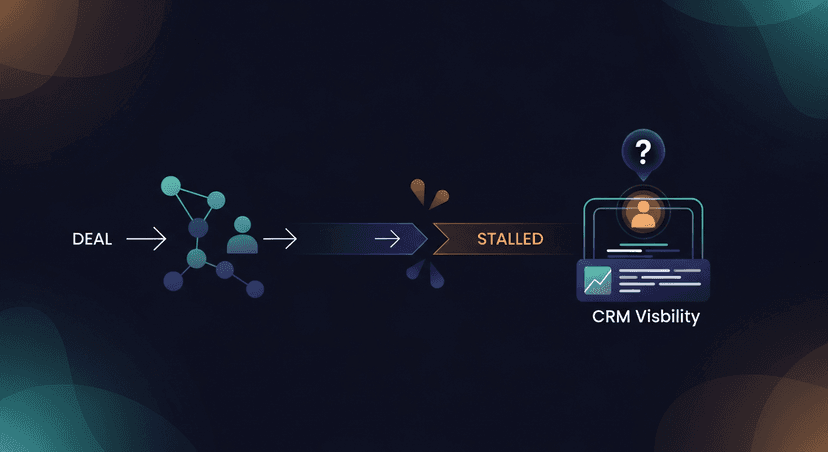
A Tuesday afternoon. You're reviewing your pipeline. One deal. Felt hot a week ago. Now… silence. You sent the follow-up. Maybe another. Still nothing. The CRM shows "Follow-up Sent." But it doesn't tell you the deal is already whispering its death rattle. Most deals don't crash and burn. They stall. They fade. And the signals a deal is stalling? They're rarely in your CRM. They're in the conversations you had, or the silence you're getting.
That gut feeling is usually right. The deal is stuck. It's just not officially "stuck" yet. Your CRM won't flag it. Not until it's too late. The activity log shows your diligence: a discovery call, a demo, a proposal sent. Then a series of "just bumping this" emails. The problem? That whole sequence, even when executed perfectly, misses the real story. It misses the shift.
I mean, the standard sales playbook doesn’t really account for the insidious, quiet fade. The kind where a prospect doesn't say "no," they just stop responding. Or they start sending one-word emails. These aren't just minor hiccups; they're the early deal stall indicators, often weeks before your pipeline health report picks up on it.
Why Your CRM Misses These Deal Stall Indicators
So, why is this so hard to see? Well, CRMs are built on structured data: tasks, opportunities, stages. They're not built for the messy, unstructured reality of human conversation and external chaos. My research shows some recurring blind spots, big ones.
First, champion departure. This one's a killer. A key champion leaves mid-cycle, and your AE doesn't find out until weeks of silence have passed. The original sponsor of the deal? Gone. The new CFO or decision-maker? Already re-evaluating vendors, or worse, has already picked someone else. Your CRM doesn't track contact-level role changes in real time. No alert fires. You're just... emailing into the void.
Then there's the ghosting problem. Not all silence is equal. Is the contact busy? Lost internal support? Or did they just select a competitor? Reps have no signal to distinguish organic ghosting from genuine deal death. You keep nurturing, keep adding value, but the underlying deal might be a goner. One AE I read about on Reddit sent "polite bumps, new thread, forwarded thread, 'bumping this to top of inbox,' value adds, case studies." For 97 days. That's a lot of wasted effort on what was likely a dead deal from day one of the ghosting.
Finally, macro and political disruptions. These are the silent assassins. Tariffs, budget freezes, leadership changes at the buyer's company. They cause buyers to quietly pause deals. No formal communication. Salespeople report pipeline appearing healthy in Salesforce while conversations have effectively stopped. Prospects don't say 'no,' they just stop responding. No current tool surfaces 'deal paused due to external environment' as a distinct risk signal. It's just… radio silence.
The common thread here? Critical deal signals exist in your call transcripts and conversations. But they're never converted into structured, actionable data. Your CRM operates on incomplete inputs.
What Doesn't Work: Guessing and Generic Bumps
I've seen sales teams try everything. Manual tracking in spreadsheets. Daily stand-ups focused on "red flag" deals. Some AEs just have a "gut feeling" list they keep in their head. The problem is, none of this scales. It's reactive. And it relies on individual reps consistently remembering and sharing every nuance. Which, let's be real, doesn't always happen when they're swamped.
And the "polite bump" strategy? It feels proactive. You're doing something. But if the champion's gone, or the company just froze all new spending, another case study isn't going to fix it. It's like trying to restart a dead car by polishing the hubcaps. You're expending effort, but not addressing the underlying issue.
What Actually Works: Reading the Signals, Then Acting Fast
What actually works is having a way to read those signals that live in the transcript, then convert them into action. This is the last mile of sales AI. It's about taking the messy reality of a conversation and pulling out the bits that tell you if a deal is truly healthy, or if it's got a problem.
For instance, if a prospect mentions a key stakeholder might be leaving, that's a signal. If they shift from talking about "our next steps" to "we'll circle back after things calm down internally," that's a signal.
Here's how I think about solving it:
- Spot the verbal cues: When a meeting transcript shows a sudden change in tone, a shift from concrete next steps to vague "let's revisit," or mentions of internal reorganizations, that's your cue. These are the whispers.
- Act fast, but smartly: Once you have that signal, you need to adjust your follow-up. Don't just send another "bumping this." Send something that acknowledges the potential stall, or re-engages around the new reality.
This is exactly why I built ReplySequence. It's the post-meeting email layer. You're already using something like Fireflies or Otter or Fathom to record and transcribe your meetings. Great. I'm not here to replace them. I'm here to complement them. Think: transcript in, follow-up out.
You paste your transcript into ReplySequence. Doesn't matter where it came from – Zoom, Teams, Google Meet, even a Word doc. BYOT. Then, instead of just a generic follow-up, you get a draft that's already pulling out key points, objections, and potential stall signals. It helps you draft an email that addresses the real situation, not just the last thing you talked about.
And because it learns from your edits – that's the voice-fingerprint feature – your drafts sound like you. Not like some generic AI blather. So, if I see a transcript where a champion seems to be pulling back, I might use RS to draft an email like this:
Subject: [Company] + [My Company] - Quick Check-in on [Project]

Hi [First Name],

Hope you had a good week.

I was reviewing our last call and heard you mention some internal shifts on the [Project Name] side. Totally understand things can get dynamic.

Wanted to check in and see if this impacts our proposed next steps for [Specific Action Item]? Happy to adjust our timeline or focus if needed.

No pressure at all, just want to make sure we're aligned.

Best,

Jimmy
See how that’s different? It’s not a blind bump. It’s an acknowledgment. It gives the prospect an easy out, or an easy way to re-engage with the new context. It converts a vague signal into a targeted, personal touch. It moves beyond "did I send enough emails?" to "did I send the right email for the current state of this deal?"
ReplySequence isn't about auto-sending blind. Never. Trust is non-negotiable. It's about giving you the best possible draft, in 60 seconds, so you can review it, tweak it, and send it, knowing you're addressing the real situation. It's about making sure the meeting went great – and then something actually happens. Not just silence.
The CRM will tell you when a deal is in "Stalled" stage. But by then, it's often a post-mortem. The real value is catching those early whispers of a problem. They're hidden in plain sight, in your conversations. My goal with ReplySequence is to give you the tool to hear them, interpret them, and act on them, proactively, before your pipeline knows what hit it. No more wasted time on deals that died weeks ago.
How ReplySequence handles this
ReplySequence takes any meeting transcript, paste it in from Zoom, Teams, Meet, WebEx, Fireflies, Granola, or wherever, and drafts a context-rich follow-up email in about 8 seconds. You review it, make any edits, and approve. Deal intelligence builds automatically.