Post-Meeting Sales Automation: How to Set It Up
Avoma, HubSpot, and ZoomInfo own the SERP for "post-meeting sales automation", and every one of them frames it as a feature of their recorder or CRM. That framing buries the actual problem: the meeting ends, the transcript exists, and nothing happens next. The rep means to write the follow-up. It takes 40 minutes. Or it doesn't happen at all.
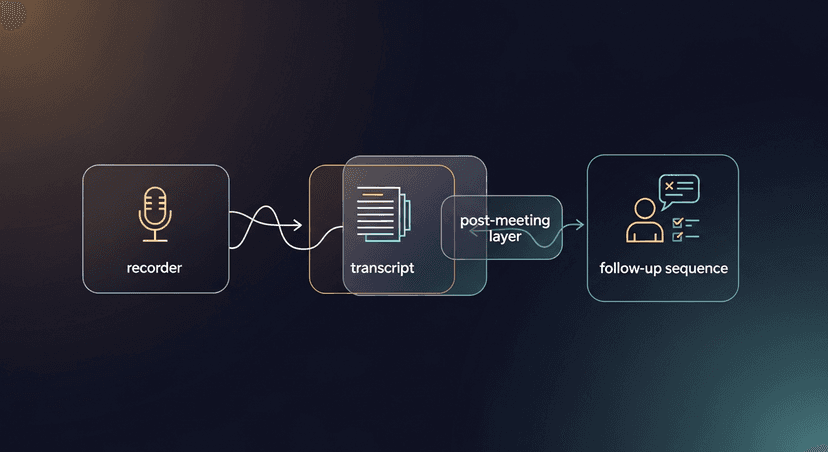
Post-meeting sales automation is a distinct workflow layer (separate from recording, separate from CRM) that converts a meeting transcript into a sent follow-up sequence. You don't need a new recorder to set it up. You need five steps and the transcript you already have.
What Post-Meeting Sales Automation Actually Is
Your recorder (Fireflies, Otter, Fathom, Granola, Zoom, Teams) does one job: it produces a transcript. Post-meeting sales automation is what happens after that. It's the workflow that takes the transcript and produces a follow-up email, a CRM log entry, and a next-step sequence without the rep spending 40 minutes staring at a blank compose window.
The recorder transcribes. The post-meeting layer follows up. These are two different tools solving two different problems. Most teams have the first. Almost none have the second running as an actual system.
What You Need Before You Start
Three things:
- A transcript source. Any recorder works, Fireflies, Otter, Fathom, Granola, Zoom, Teams, Google Meet. No recorder? Paste notes or a Word doc. The transcript is the only required input.
- The email client you actually send from. Gmail, Outlook, doesn't matter. You're sending from your own inbox, not a tool's domain.
- A decision on CRM logging. HubSpot, Salesforce, Pipedrive, a Notion database, a spreadsheet, pick one. You need somewhere to write the deal stage and next-step date after the email goes out.
That's it. No new recorder. No enterprise contract.
Step 1: Get a Clean Transcript Out of Your Recorder
Action: Export or copy the transcript from your recorder immediately after the meeting ends.
Every major recorder has a copy or export button. In Fireflies, it's under the transcript tab, copy the full text. In Otter, export as TXT. In Fathom, copy the transcript from the recap page. In Zoom, find the transcript in the meeting summary email or the web portal.
The format you're targeting is speaker-labeled text:
Rep: What's the biggest friction point in your current process?
Prospect: Honestly, we lose deals in the handoff between SDR and AE. By the time the AE reaches out, the context is gone.
Speaker labels matter because they let you pull the prospect's exact words in the next step. A wall of unlabeled text makes that extraction slow and error-prone. If your recorder doesn't label speakers, spend 60 seconds skimming and marking the prospect turns before moving on, quality here determines quality downstream.
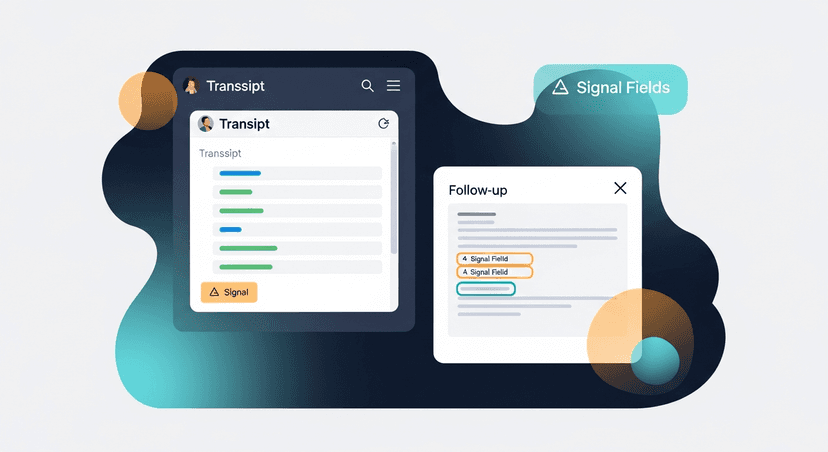
Step 2: Extract the Four Signal Fields
Action: Before writing a single word of the email, pull these four fields from the transcript.
- Stated pain or problem: the specific problem the prospect named, in their words
- Next step or commitment, what was agreed: demo, proposal, intro call, decision date
- Objection or hesitation surfaced, anything they pushed back on or expressed uncertainty about
- Prospect's exact phrases: two or three word-for-word lines you can echo back
Here's what that extraction looks like from a real transcript snippet:
Transcript snippet:
Prospect: "We lose deals in the handoff between SDR and AE. By the time
the AE reaches out, the context is gone and the prospect feels like
they're starting over."
Rep: "Makes sense. Want me to send over a workflow doc that maps how
other teams handle that handoff?"
Prospect: "Yeah, that'd be useful. Though I'll need to run anything new
past our VP of Sales before we commit to a trial."

Extracted fields:
1. Pain: SDR-to-AE handoff, context loss, prospect re-education
2. Next step: Send workflow doc; prospect to brief VP of Sales
3. Objection: Needs VP approval before trial
4. Prospect's words: "context is gone," "starting over," "run it past our VP"
Those four fields are your email. Everything else in the transcript is noise for this purpose.
Step 3: Draft the Follow-Up Email From Those Fields
Action: Build the email in three parts (callback, next step, CTA) using the fields you just extracted.
Structure:
- Subject: Reference the pain or the next step, not a generic "Following up"
- Opening sentence: Echo the prospect's words back at them
- Body (2-3 sentences): Confirm the next step and address the objection directly
- CTA: One clear ask, not two
Filled-in example:
Subject: Workflow doc, SDR/AE handoff context

Hi [First Name],

You said the context is gone by the time the AE reaches out: that's
exactly what the doc below addresses. I've attached a workflow three
other teams use to keep deal context intact through the handoff.

I know you'll want to loop in your VP of Sales before moving forward.
Worth a 20-minute call with the three of us once you've had a chance
to share it?

[Your Name]
Notice what's not in there: a recap of everything discussed, a bullet list of your product's features, the word "just" as in "just checking in."
If you don't want to do steps 1–3 manually, paste your transcript into ReplySequence: it pulls the signal fields and produces a draft like the one above in 60 seconds.
Step 4: Build the Sequence: Not Just One Email
Action: Turn the single draft into a three-touch sequence with defined timing.
One email is not a workflow. A system looks like this:
T+0, same day, within 2 hours of the meeting:
Subject: Workflow doc, SDR/AE handoff context (the email from Step 3)
T+3, day 3, if no reply:
Subject: Re: Workflow doc, SDR/AE handoff context
Opener: Wanted to make sure the doc landed, sometimes these hit the spam folder.
T+7, day 7 bump:
Subject: Still worth a conversation?
Opener: No pressure, if the timing isn't right, just say the word and I'll leave it alone.
Each touchpoint does one thing: it removes a friction point between the prospect and the next step. T+0 delivers the value promised. T+3 removes the "I forgot" excuse. T+7 lowers the stakes.
The sequence is the difference between a draft and a system. Without it, you're trusting the prospect to reply to one email and then acting on it. That's not a workflow.
Step 5: Log It and Trigger the Next Action
Action: Update the CRM and set the follow-up date before you close the meeting tab.
What to paste into the CRM note:
Meeting date: [date]
Deal stage: Discovery → Solution
Pain stated: SDR/AE handoff, context loss
Objection: Needs VP approval before trial
Commitment: Sending workflow doc; prospect to brief VP
Next follow-up: [date + 3 days]
The "done" state for this workflow is not "email sent." It's:
- Sequence running (T+0 sent, T+3 and T+7 scheduled)
- CRM note updated with objection and commitment
- Calendar invite sent if a next call was agreed
If you close the tab before all three are done, the workflow has a hole in it. Plugging that hole is the whole point of treating this as automation rather than intention.
Three Things That Break This Workflow
Waiting more than 2 hours. Research from Velocify (now Velocify/Salesforce) found that lead response time has an exponential decay effect on conversion: the same logic applies to follow-up. The prospect's memory of the meeting is sharpest in the first two hours. After 24 hours, your email is competing with their next five meetings.
Writing to summarize instead of advance. The follow-up email is not meeting notes. Nobody asked for a transcript of what was discussed. The email should move the deal: confirm the next step, address the objection, ask for the calendar. Every sentence that doesn't do one of those three things should be cut.
Using a GPT default draft without editing. Generic AI output reads like generic AI output, and the prospect has now received seventeen emails that start with "Thank you so much for taking the time." Voice-fingerprinting (RS learns from your edits over time so drafts start sounding like you) solves this systematically. Manually, it means reading the draft out loud before sending and cutting anything that doesn't sound like how you actually talk.
—-
Five steps, and the meeting follow-up becomes a system instead of a good intention. The free tier at ReplySequence covers 10 drafts a month (no credit card) if you want to skip the manual extraction and get straight to the sequence.
How ReplySequence handles this
ReplySequence takes any meeting transcript, paste it in from Zoom, Teams, Meet, WebEx, Fireflies, Granola, or wherever, and drafts a context-rich follow-up email in about 8 seconds. You review it, make any edits, and approve. Deal intelligence builds automatically.