Recruiter Follow-Up Automation: Post-Interview Emails Fast
Recruiter Follow-Up Automation: Post-Interview Emails in 60 Seconds
The interview just ended. The candidate was strong, the hiring manager is interested, and now you're staring at a blank email knowing you need to send a follow-up before they get an offer somewhere else. Recruiter follow-up automation doesn't require an enterprise ATS or a new platform. It requires a transcript, a template, and a five-step workflow you can repeat in under 60 seconds per candidate.

—-
What You Need Before You Start
Two things:
- A transcript. Fireflies export, Otter copy, Zoom auto-captions downloaded as .txt, Granola's summary pane, or even a doc of notes you typed during the call. The source doesn't matter. If it captures what was said, it works.
- A template skeleton. A rough structure you can drop signal into, subject line slot, opening sentence, one transcript-specific line, next step, CTA. You'll build that in steps 3 and 4.
No special integrations. No bot sitting in the meeting. This is BYOT, bring your own transcript.
—-
Step 1: Pull Your Transcript From Whatever You Used
The copy-paste move varies by tool:
- Fireflies: Open the meeting summary → click Transcript tab → Copy transcript
- Otter: Open the conversation → highlight all → Copy
- Zoom: Recordings → find the meeting → Download → choose the .vtt or .txt transcript file
- Granola: Open the note → click the full transcript view → select all, copy
- Manual notes: Paste your doc directly. Even bullet points work.
You don't need the whole thing. A raw transcript chunk looks like this:
[00:04:12] Candidate: I've been managing a team of six engineers for the last two years,
  mostly on infrastructure migration projects.
[00:04:31] Recruiter: And the timeline you mentioned: you're available to start mid-August?
[00:04:38] Candidate: Yes, mid-August works well.
That three-line block just gave you everything you need for a personalized follow-up.
—-
Step 2: Strip It Down to Signal, Not Noise
Don't read the whole transcript. Skim for three things:
- A role-specific detail the candidate mentioned: a project, a team size, a tool they named
- The next step that was agreed on, second interview, take-home, reference call, offer call
- A timeline, their availability, your hiring decision window, whatever was said explicitly
Your extracted signal block should look like this:
Detail:    Managed 6-person infra team, led AWS migration project
Next step: Technical interview with VP Eng: we said we'd schedule by Thursday
Timeline:  Candidate available to start mid-August
Four lines. That's all you're carrying into step 3.
—-
Step 3: Build Your Subject Line From the Transcript, Not From Memory
"Following up on our interview" gets ignored. It's in every inbox. It tells the candidate nothing about which conversation, which role, or whether you're moving forward.
Subject lines built from transcript signal are specific enough to stand out:
Next steps: [First Name] / VP Eng interview, Thursday
Quick follow-up: your AWS experience + what comes next
[Role] at [Company], scheduling your technical round
All three are under 60 characters. All three reference something real from the conversation. Pick the one that matches your tone.
—-
Step 4: Write the Email Body in One Pass (Template + Personalization Slots)
This is the full template. Copy it, fill the brackets, send.
Subject: Next steps: [First Name] / [Role], [specific next step]

Hi [First Name],

Really enjoyed talking today. Your background managing [detail from transcript,
e.g., a 6-person infra team through an AWS migration] is exactly the kind of
experience [Hiring Manager First Name] and the team are looking for.

Next step is a technical interview with [Hiring Manager Name / Team]. I'll send
a calendar invite by [day you promised, e.g., Thursday EOD].

In the meantime, if anything comes up or you have questions about the role, just
reply here.

[Your name]
Opening line: warm, direct, no filler. Transcript-specific sentence: one line, pulls from your extracted signal block. Next step: explicit, with a day attached. CTA: reply here, low friction.
The whole email is under 100 words. That's intentional. Candidates read short emails. Long ones feel like a form letter.
—-
Step 5: Send Within 2 Hours (and What to Do If You Miss the Window)
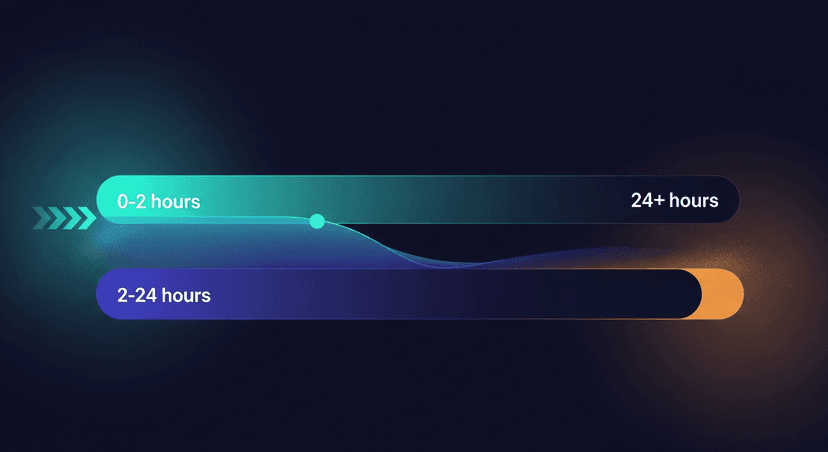
Send within 2 hours of the interview ending. That's the hard rule.
Research from Yesware and similar sales engagement platforms consistently shows that email open rates drop sharply the longer a follow-up waits after a high-attention moment, and an interview is a high-attention moment for the candidate. They're checking their inbox. They're talking to their partner. They're deciding how they feel about the role. A follow-up that lands in that window reinforces momentum. One that lands at 6pm after a full day of interviews lands in a pile.
24 hours is the absolute maximum. After that, the warmth of the conversation is gone and the email reads like an administrative formality.
If you missed the 2-hour window, use a recovery subject line that acknowledges the gap without over-explaining it:
Following up, [First Name] / [Role] next stepsSimple. No apology. Get to the next step in sentence one.
—-
If You're Running 8+ Interviews a Week, Automate Steps 3–4
The manual workflow above works. If you're doing two or three interviews a week, it's fast enough.
At eight or more, the bottleneck is real. Steps 3 and 4 (extracting signal and drafting the email) take 10-15 minutes per candidate when you're doing them by hand, across every transcript, every day.
That's where ReplySequence fits. Paste the transcript, get a branded draft back in 60 seconds. The voice-fingerprint feature learns from your edits over time, so the drafts stop sounding like GPT output and start sounding like you. You review, adjust if needed, send. Draft-first, always, nothing goes out without your eyes on it.
Free plan covers 10 drafts a month. Pro is $29/mo for unlimited. No credit card required to start.
—-
Three Things Recruiters Get Wrong With Post-Interview Emails
1. Sending the same template to every candidate with no transcript signal.
Here's what that looks like:
> "Hi [Name], thank you for taking the time to speak with us today. We enjoyed learning more about your background and will be in touch soon."
Versus:
> "Your experience leading the AWS migration is exactly what [Hiring Manager] wanted to dig into, technical interview coming your way by Thursday."
The first one could've been written before the interview happened. The candidate knows it. The second one proves you were listening.
2. Burying the next step in paragraph 3.
Candidates skim. If the next step (interview, offer, rejection, whatever it is) isn't in the first four sentences, many won't find it. Lead with it or put it in a standalone sentence at the top.
3. Waiting until end of day.
By 5pm you've forgotten which candidate said what. The transcript doesn't forget, but your instinct to personalize fades fast. Write the email in the 15 minutes after the interview while the conversation is still in your head, or queue it immediately with your extracted signal block from step 2.
—-
The workflow is simple: pull the transcript, extract three pieces of signal, build the subject line from that signal, send the template within 2 hours. That's recruiter post-interview email automation without buying a new platform. It's just a transcript and a process.
How ReplySequence handles this
ReplySequence takes any meeting transcript, paste it in from Zoom, Teams, Meet, WebEx, Fireflies, Granola, or wherever, and drafts a context-rich follow-up email in about 8 seconds. You review it, make any edits, and approve. Deal intelligence builds automatically.